Why Your Shopify Site Takes 35 Seconds to Load (And How We Fixed It in 4 Days)
This blog explains how we optimized a slow Shopify store from 35+ seconds to around 2 seconds in just 4 days, without rebuilding the website. It covers the specific optimization work—app cleanup, image compression, script optimization, unused code removal and lazy loading. It also explains why Shopify speed matters for user experience, conversions and SEO, how to check your store’s speed, and offers a free code audit.
On this page
The short version
35-second → 2-second real-world improvement
Why Shopify stores become slow
Apps, images, scripts, unused code and lazy loading
Google PageSpeed Insights & Core Web Vitals
How the site was optimized in 4 days
Why a full Shopify rebuild may not be necessary
An e-commerce store owner came to us with a straightforward problem his site was so slow it was like being stuck in gridlock, unable to move. No matter which product page you opened on a mobile device, it took nearly a full minute for all content to load completely. Customers would often close the tab before the "Add to Cart" button even finished loading, they left before ever seeing the entry point to place an order.
The previous developer who built his site only offered one solution, tear the entire site down and rebuild it from scratch. Switch to a brand-new theme, overhaul the full technical architecture, spend several months and thousands of dollars, and the site might get a little faster. In other words, even after investing that much time and money, there was still no guarantee the speed would improve.
We didn't rebuild it. We simply conducted a full audit of his site's code, identified every issue dragging download times one by one, and in just four days, we brought the entire store's load time down to around 2 seconds. We kept the original theme, the store stayed exactly as it was, and there was never any need for a full site-wide renovation.
If your Shopify store feels slow too, the solution is almost certainly simpler and cheaper than anything you've heard before. Below, we break down exactly what goes wrong with most underperforming stores, the data that backs up our assessments, and the unique approach we used to fix this.
A slow Shopify store is more common than you'd think
If you've ever opened your own store on a regular mobile data connection, stared at the spinning loading icon until you lost patience, that wasn't a flaw in your perception, and you weren't being impatient nearly every owner of this type of online store has dealt with the same frustration. Shopify's own load time research confirms that right now, fewer than half of all mobile stores meet Google's "good" Core Web Vitals standard —only 48% of mobile stores pass, compared to 56% of desktop stores. Looking specifically at Largest Contentful Paint, the gap is even wider on mobile: only 62% of mobile pages earn a good score, versus 74% of desktop pages.
Put simply, Largest Contentful Paint measures the time it takes for the core, primary piece of content on a page to finish loading. If this metric is dragging you down, it basically means users open your page and have to wait forever to see your most important product images or descriptions.
So no, a 35-second load time isn't some rare horror story. It's what happens after two years of adding apps, swapping themes, and never once auditing what all of that is costing on the front end.
How exactly do these losses hit you?
It's not just that browsing the store feels like a hassle for customers, this frustrating user experience directly translates to lost money out of your pocket, and most store owners drastically underestimate the scale of that loss.
Shopify's own 2026 analysis, which drew data from a huge pool of active, real-world online stores, reached this conclusion: for every additional 100 milliseconds, or 0.1 seconds, of load time, the share of customers who complete a purchase drops by roughly 3.5%. Compare a smooth store that loads in 2 seconds to that slow store that takes 35 seconds, and the gap between them is no trivial, ignorable difference tons of revenue that should have landed in your bank account just slips away for nothing.
Google's published Milliseconds Make Millions case study also documented a large-scale survey it ran in partnership with Deloitte: the research covered 37 retail brands and tracked the real visit behaviour of more than 30 million users. It found that cutting mobile load times by just 0.1 seconds boosted retail conversion rates by 8.4% and increased customers' average order value by 9.2%.
No lazy loading on image-heavy pages Google uses to judge how a page actually feels to load and use have been a confirmed Google ranking signal since 2021A slow store isn't just losing customers who arrive; it's less likely to show up for the ones who haven't found you yet.
Shopify's official load speed target is under 3 seconds for desktop and under 5 seconds for mobile, go over that threshold, and most visitors will clearly perceive the page as too slow. Users' patience threshold is far lower than most store owners assume.
At the end of the day, an online store that takes 35 seconds to load isn't just suffering from minor performance issues. It sends customers who were otherwise ready to spend money straight back to the search results page, or the ad page they clicked through from, before they ever even see a single product.
if you are looking to migrate your store to shopify we can help you in the same, see our migration services.
Where all that loading time actually goes
No one sets out on purpose to build an absurdly slow online store. Slow load times build up gradually: you make one small choice today, add one small feature tomorrow, tweak one small setting, and by the time a store owner finally notices their site is so slow it takes half a minute to load content, they usually can't point to one single problem as the root cause—it's almost always four or five small issues stacking up that tank the entire site's speed. Across every store we've ever audited, the same set of problems crop up over and over.
The first is installing too many unused apps: the value these apps create can never justify the load resources they consume. Every app you install adds an extra block of its own code to your pages, and the vast majority of apps load on every single page, whether the current page needs that app's functionality or not. Even a review widget that only appears on your homepage, a currency conversion tool on product pages, or an add-to-cart popup that fires across your entire site, each of these quietly siphons off a little load speed. Stack those tiny losses up, and your site's speed plummets fast.
Next is unoptimized images: Product images do help you sell goods, but a 4MB hero image, loading the full-resolution original file meant for desktop screens directly onto a mobile display, is completely useless bloat. This is almost always the single highest-impact, simplest-to-fix item in any speed optimization plan, you'll see an immediate speed boost as soon as you address it.
Then there are render-blocking scripts: So many site templates and apps load JavaScript and CSS in incredibly inefficient ways, forcing the browser to pause all work and wait for those files to finish loading before it can show any page content to the visitor. Your page isn't broken, it's just being told to wait for a resource that could have loaded quietly in the background, without interrupting the user's browsing, adding several seconds of unnecessary blank wait time for no reason.
Another issue is templates piled high with redundant code: leftover from years of uncoordinated edits. Snippets of old code left behind by the three previous developers who customized your template are still sitting in your store's files, running every time a page loads. They do nothing but slow your site down they're equivalent to having to move a stack of useless cardboard boxes out of the way every time you open a page, before you can ever lay out your actual content.
Failing to enable lazy loading : The last common problem is failing to enable lazy loading on product collection pages with lots of images. If someone opens a collection page and your site tries to load 50 product images all at once, instead of only loading the handful that fit on the visitor's current screen, that creates 50 completely unnecessary load requests all fighting for bandwidth on the same limited connection. None of them can run smoothly, and the page inevitably gets stuck on that spinning loading icon.
None of these issues require you to tear your entire online store down and rebuild it. You just need someone who knows what they're doing, who knows exactly where to look for problems, to identify and fix each of these pitfalls one by one. You don't have to spend months rebuilding your site or pay a huge sum to switch to a brand-new technical architecture you can restore your site's speed with very little time and cost.
How we actually fixed it in 4 days
What follows is the full, unvarnished breakdown of how we actually completed this work in just four days, no fancy, polished marketing fluff: speeding up a website is never accomplished by piling on new features or new plugins. On the contrary, it's about clearing out all the useless bloat that's accumulated on your site over the years.
We didn't just dump the store's URL into Page Speed Insights, grab a score, and call it a day. That basic check is simple enough for anyone to run, but to find the root cause of your slow load times, you have to dig much deeper. We dived line by line through the site's theme code, pulled a full list of all installed apps, mapped out every single script that runs when any page loads, and confirmed exactly why each script exists and what it does. The core changes we implemented boiled down to these key actions:
We audited every installed app. Any app that forced its script to run on every page across the entire site, regardless of whether the current page needed it, was either deleted entirely or replaced with a legitimate alternative that only loads when needed.
We compressed every image on the site and adjusted image delivery rules to only serve images sized to match the accessing device's actual screen resolution. We stopped sending mobile users the full-size large images meant for large desktop screens, which wasted load bandwidth for no reason.
We adjusted the load order of all scripts and delayed the loading of non-essential scripts, so that the instant a user opens a page, the browser can immediately render the content they can see on their screen. It never gets stuck on third-party code that runs quietly in the background and that visitors never even notice.
We cleared out invalid theme code left behind by years of unmaintained edits—those years-old unused code snippets that no one ever deleted after modifying the site, just left in the codebase to drag performance down.
We added lazy loading to image-heavy templates like product lists, so the browser only prioritizes loading content that fits on the visitor's current screen, instead of pulling down dozens of images the second the page opens.
The Result is
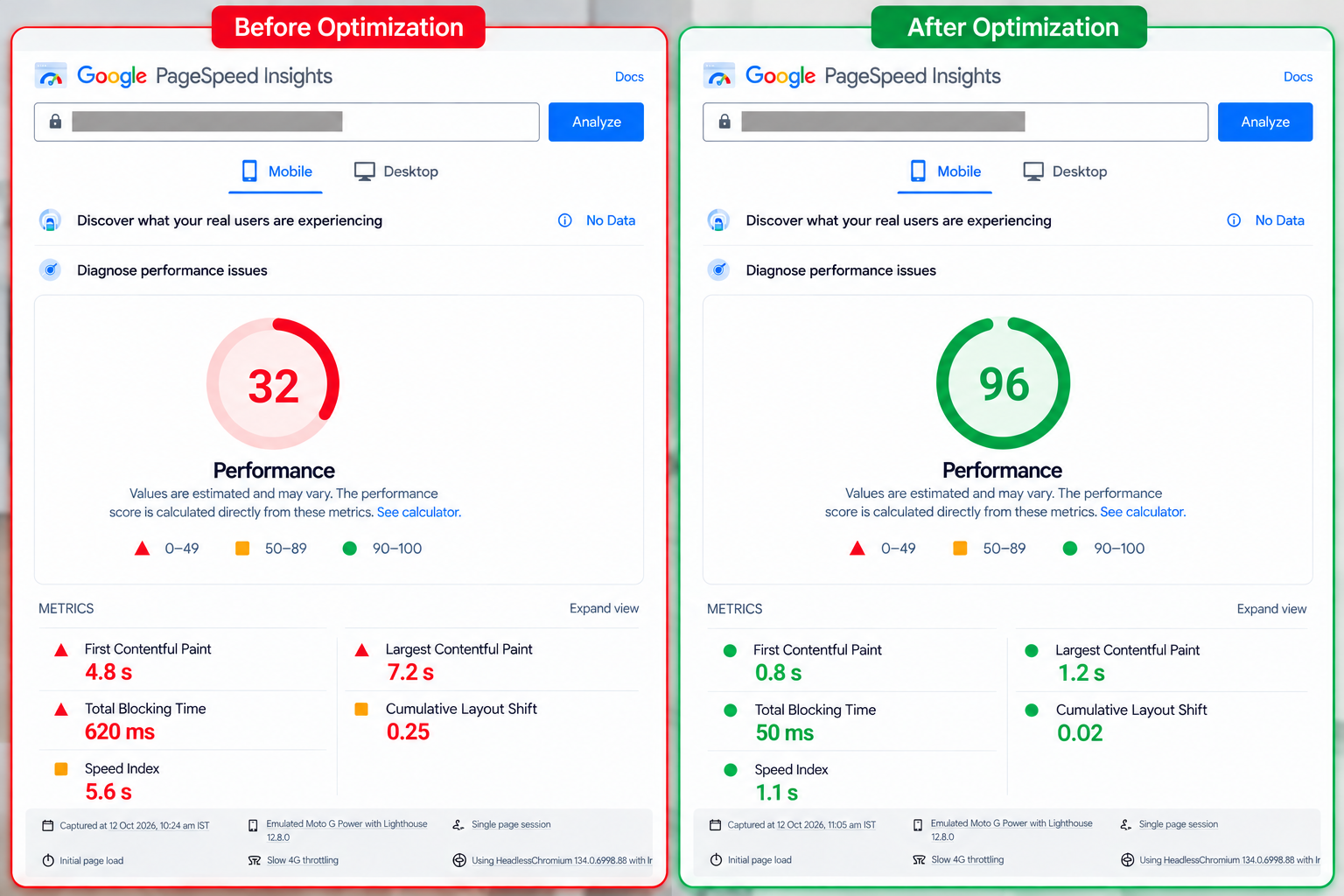
After four days, the store was still the exact same store. The site's theme, page design, and all functional features were left completely untouched, but load time dropped from the original 35 seconds to around 2 seconds. One customer summarized this before-and-after change perfectly in their review: "Load time went from over 35 seconds down to 2 seconds." We didn't rebuild the entire site, we didn't switch to a brand-new custom theme—we just cleared out all the clutter that never should have been piled into the store's code in the first place.
Why this matters for AI search too, not just Google
This isn't just something Google cares about, it's just as critical for all the new AI search tools that have launched recently. The way people search for things has changed a lot over the years: from typing keywords into Google's search box originally, to now having AI compile and organize answers for you directly. The format has evolved, but one core requirement has never changed: any webpage must load fully first, display all its content clearly on screen so it can be read properly. Only then can both the human who opened the page, and the AI system processing the content, understand what the page is about. If the page won't even load, neither humans nor AI can use it.
Whether it's Google's AI Overviews, ChatGPT's search functionality, or the dedicated AI search tool Perplexity, all these new tools operate on a crawl and index process that is fundamentally no different from the traditional search engine crawler logic that has been used for decades. They first pull in content from webpages across the internet, organize and store it in their own databases, so they can retrieve that content whenever someone runs a search.
How to check your own store right now
If you want to audit your own store right now, you don't have to guess whether your site's performance is healthy you can get a clear picture in just five minutes. Before you pay anyone to fix any potential issues, spend those five minutes first to confirm you have a slow load problem that needs addressing.
Step one: Run your store's homepage, plus your highest-priority core product page, through Google Page Speed Insights for an audit. Pay close attention to your mobile score, most Shopify store traffic comes from mobile visitors, and mobile is where the vast majority of online stores' performance issues are most severe.
Next, comb through the list of apps you have installed on your store. Any tool you can't remember installing, or can't name a specific purpose for, is a top candidate for deletion. Keeping it only adds unnecessary burden.
Then, open your site on your own phone using regular mobile data, not your office's high-speed Wi-Fi. Office Wi-Fi is almost always much faster than the mobile data most people use day-to-day. Only by opening the site on regular mobile data will you experience the same load speed that most of your customers feel when they visit your store.
Finally, count how many images load alongside other page content in the above-the-fold area you can see without scrolling down your screen. If that number is more than two or three, those extra images are almost certainly one of the causes dragging down your site's performance. Trying to load too many images at once ties up huge amounts of your network speed resources.
If your store's load time is close to 35 seconds, or even just a little shorter, as long as that problem remains unaddressed, you're throwing away revenue you should be earning every single day and the work required to fix that issue is almost certainly far less than rebuilding your entire site from scratch. There's no need to spend months on a full site overhaul.
Get a free code audit
We'll use the exact same process outlined above to audit every line of code in your store. We never work off guesswork, and we will never push a full rebuild service unless you actually have a genuine need for one. After the audit, you'll receive a site speed report, a full code quality audit, and a checklist that lists line by line exactly what elements are slowing your store down. Even if you end up not hiring us to handle the optimization, that report belongs entirely to you, to use however you want.
FAQ
Why is my Shopify store's load speed so slow?
Most underperforming Shopify stores don't fail because of one single catastrophic issue they suffer from several small problems stacking up to tank their speed: installing too many apps, whose scripts load on every page whether they're needed or not; unoptimized, oversized images that bloat the page's load size for no reason; render-blocking JavaScript that prevents the page from displaying content early; leftover unused old code from past theme customizations; and failing to enable lazy loading on image-heavy pages, which forces all images to load the second the page opens, saturating your network speed.
Do I have to rebuild my entire Shopify store to fix slow load times?
Generally, no. The vast majority of speed issues come from elements that get added gradually after you launch your store apps, scripts, unused idle code, they're not flaws in your store's original core theme. A code audit will clarify whether your situation can be fixed with a simple cleanup, or if you actually need a full rebuild, and most of the time, a cleanup is the most common and effective solution.
How much does page load speed actually impact my Shopify sales?
Shopify's own 2026 data shows that for every additional 100 milliseconds of load time, conversion rates drop by roughly 3.5%. Google and Deloitte's Milliseconds Make Millions study, which tracked more than 30 million user visits, concluded that cutting mobile load times by just one tenth of a second boosts retail conversion rates by 8.4%.
Does site speed affect my Google search ranking?
Yes. According to Google's official Search Central announcements, Google has formally included Core Web Vitals—a set of metrics that measure a site's load speed, interactivity, and visual stability—as a search ranking signal since 2021.
How long does it take to fix a slow Shopify store?
That depends on what exactly is slowing your store down, but a focused code audit and cleanup can usually be completed in just a few days, never several months. The case referenced in this article, for example, didn't require a full rebuild—it took just four days to bring a store that previously took over 35 seconds to load down to a load time of around 2 seconds.
Rather have this done than read about it? Send us the store URL. We read the code and send back the exact list, free, within 4 hours.
Get the free audit